About
Venmo—making group money
management feel human again.
Venmo is one of the most used peer-to-peer payment apps in the US, trusted by millions for splitting bills, paying friends, and managing shared expenses. But as social dynamics around money evolved, Venmo's group splitting experience didn't keep up — leaving users frustrated, doing mental math at the dinner table, and sending awkward "hey, you still owe me" texts.
This redesign rethinks the entire group payment flow from the ground up. Not a visual refresh — a structural one. The result is a flexible, smart, and friction-free system that makes splitting costs fairly feel as natural as the dinner itself.
"In today's world, splitting bills isn't just a utility — a social dynamic."
Our redesign makes group money management seamless, flexible, and non-awkward — empowering users to split costs fairly, remind tactfully, and track expenses effortlessly, without unnecessary friction or public exposure.
A Smart Calculator to help you split your bills
Enter raw prices. The system automatically calculates proportional tax and tip per item — no mental math, no arguments.
01
A Smart Calculator to help you split your bills
Enter raw prices. The system automatically calculates proportional tax and tip per item — no mental math, no arguments.
02
No need for chit-chat — just pay
Tactful reminders, clear pending states, and a redesigned home feed eliminate the social awkwardness of chasing people for money.
03
The Problem
It's been a while…
Venmo's group payment experience hadn't meaningfully evolved since the app launched. While the social feed once solved trust in digital payments, the real friction had shifted, to fairness, precision, and the awkwardness of splitting bills in groups.
The app's architecture was designed for two people exchanging money. Under the complexity of a nine-person dinner — with uneven orders, tax, tips, and individual items — it collapsed.
People Problems
What users were
actually saying
" I just want to know who owes what — I don't want to think about it.
" Reminding my friend to pay me back felt more uncomfortable than just letting it go.
" Some people ordered way more than others. Splitting evenly felt unfair but there was no easy way to do it differently.
" I use Splitwise to figure out who owes what, then Venmo to actually collect. Why are these two separate apps?
Before → After
The old flow vs. the redesign
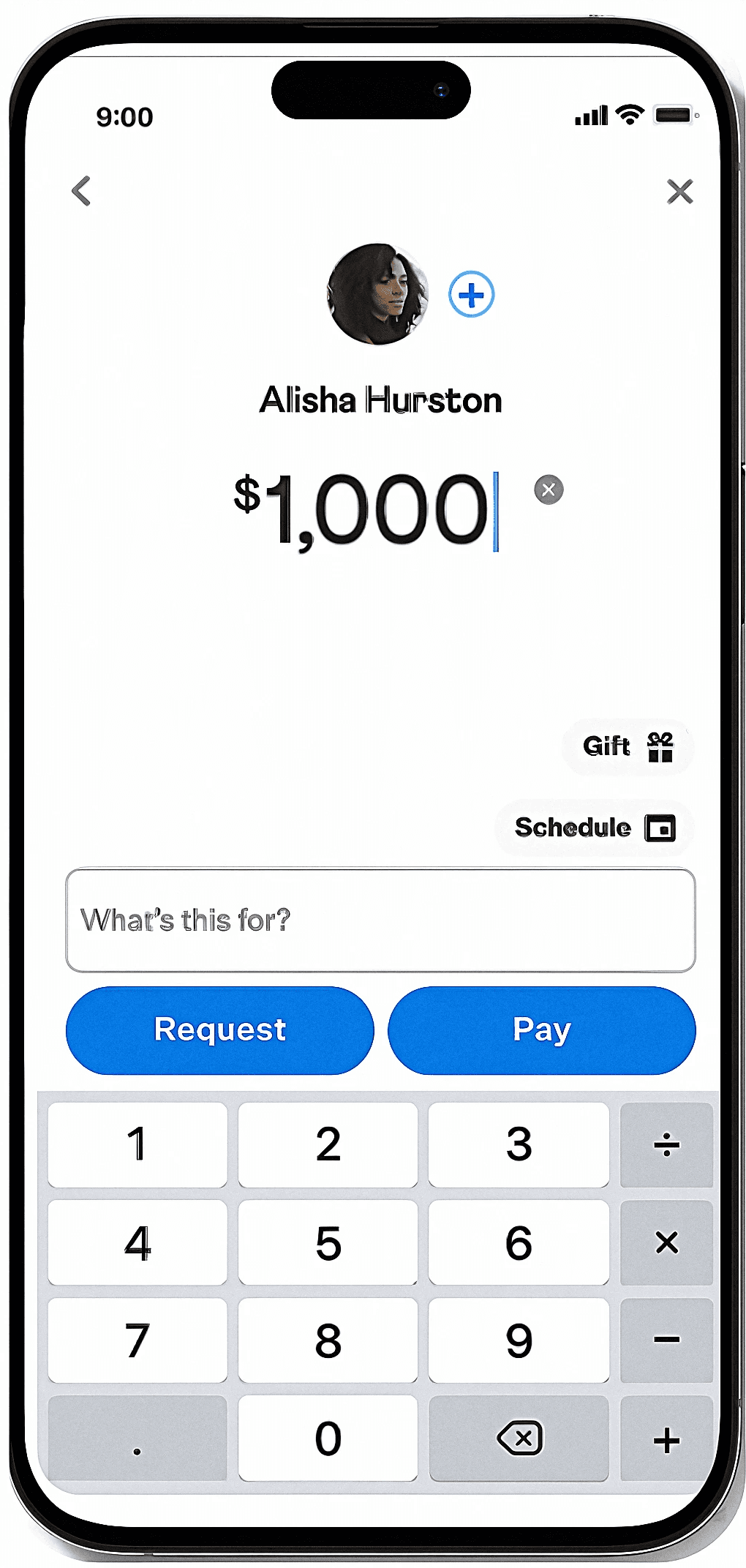
Venmo's original split was a single amount field — no item assignment, no tax handling, no group context. Here's what that looked like against the redesigned Advanced Split.
Manual math. No item assignment. Send requests one by one.
Auto tax + tip. Item-level assignment. One flow for all 9 people. and more.
Before
After
Process
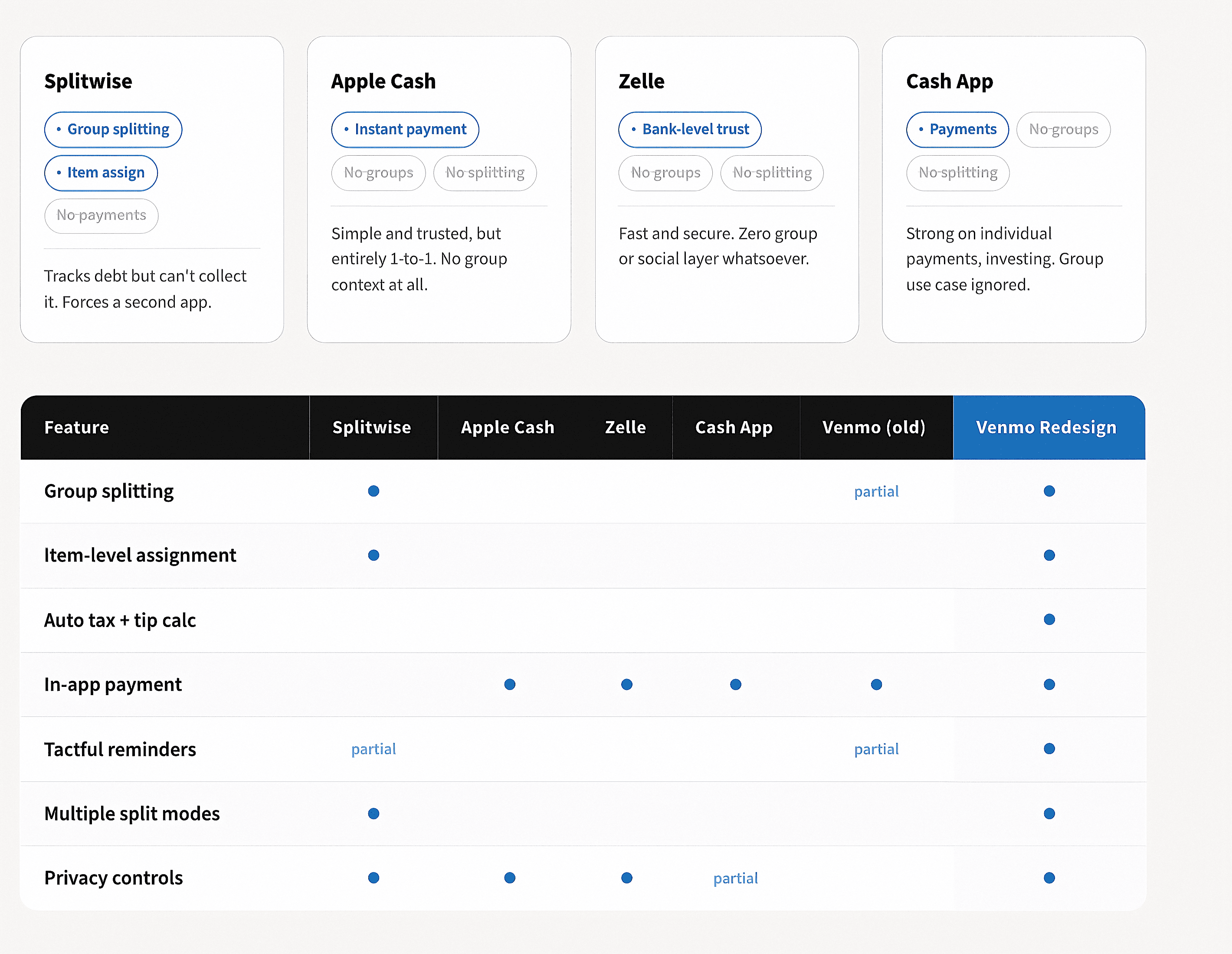
Competative Analysis
Everyone solved one piece.
Nobody solved the whole thing.
We audited four major competitors across the features that mattered most to Venmo's group payment problem.
Execution
Project Strategy
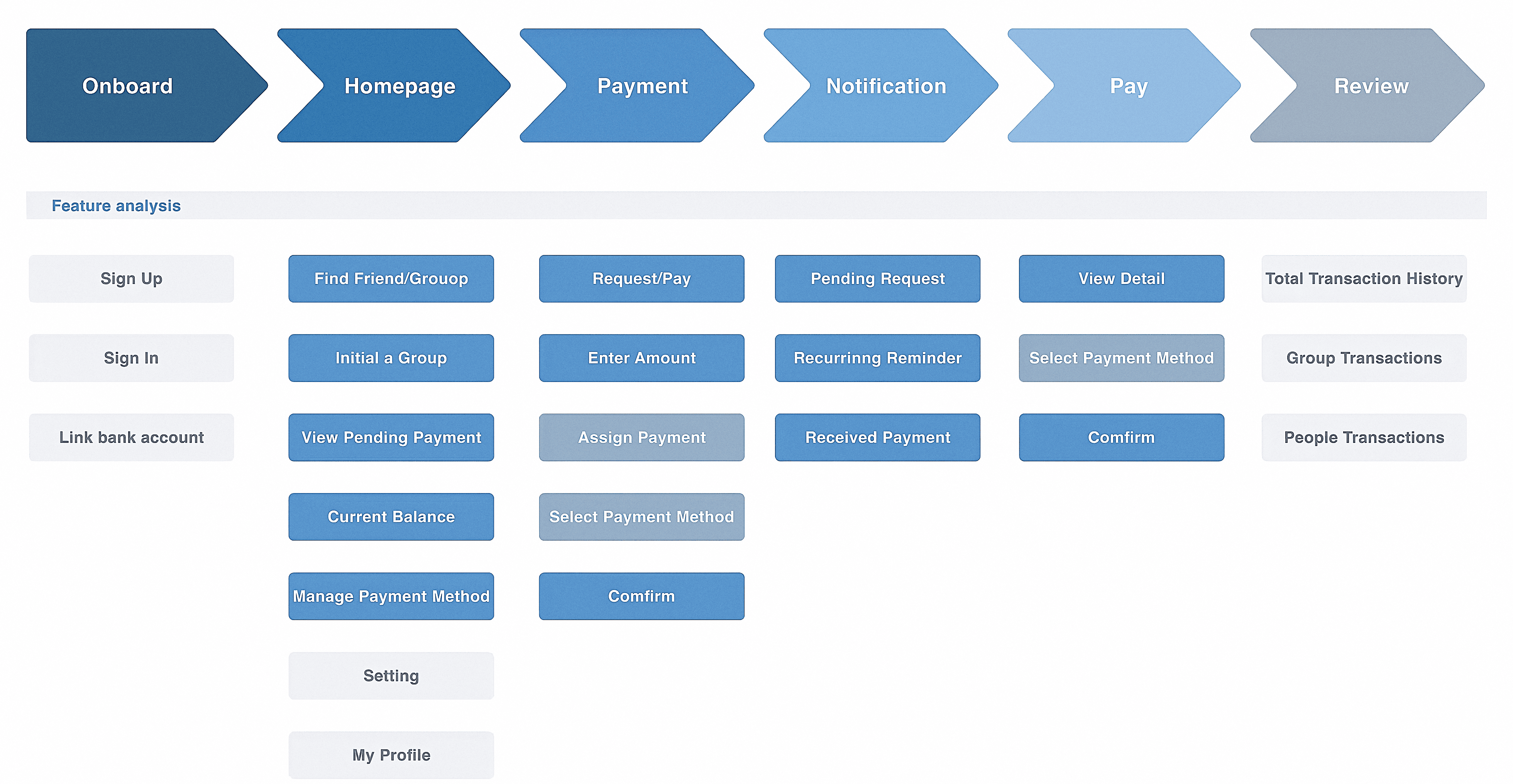
The project strategy played a crucial role in the planning phase — outlining the overall approach before touching a single screen. We mapped the full user journey across six stages, then audited every feature against each stage to expose gaps, redundancies, and opportunities.
This wasn't just an exercise. It forced every design decision to answer one question: why does this belong here?
Feature Analysis
Mapping every feature
to every stage.
We color-coded the entire feature set across the six user journey stages — surfacing what was core, what was new, and what was carried over unchanged from the original app.
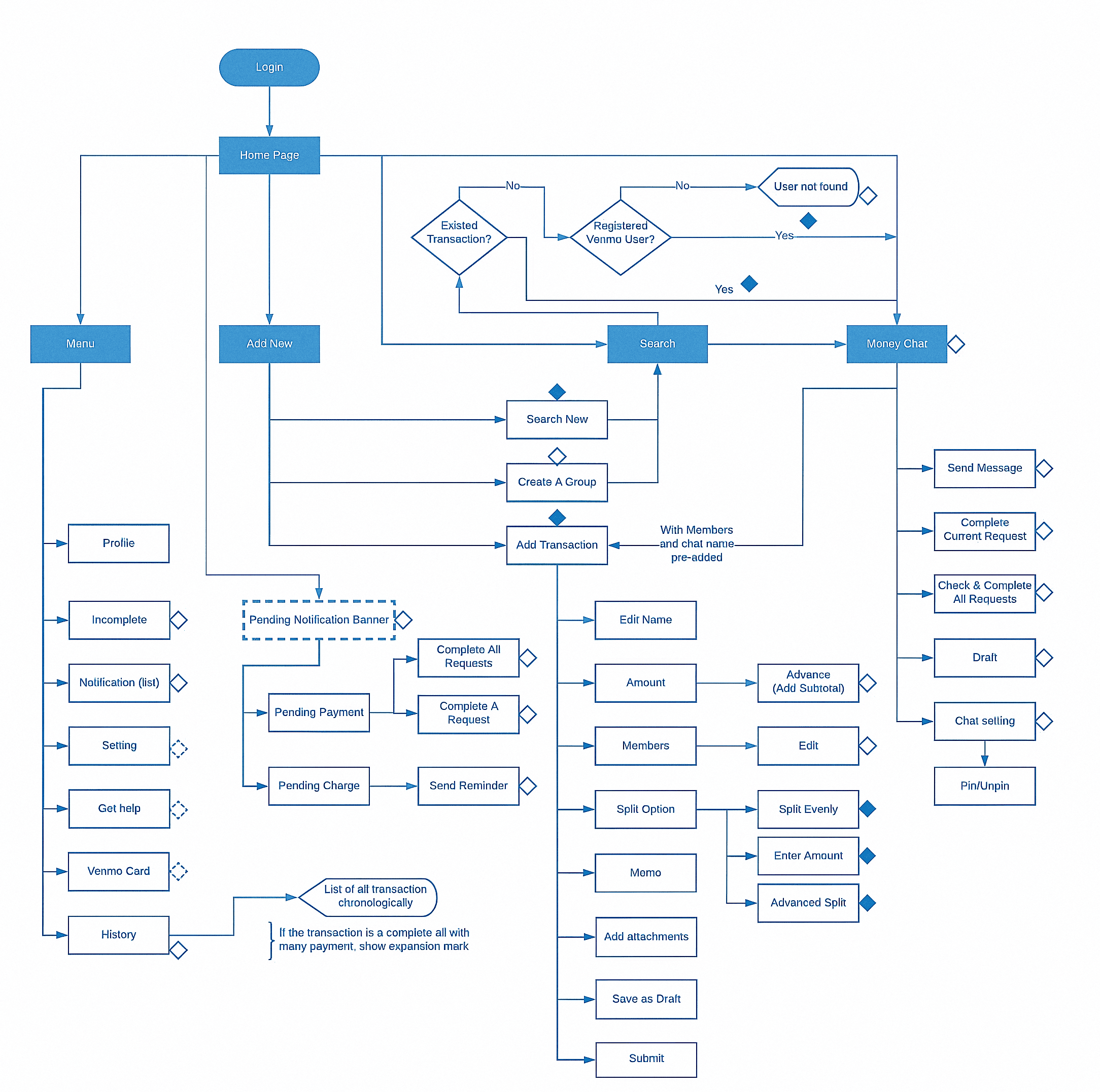
Information Architecture
Every state. Every branch.
Every decision point.
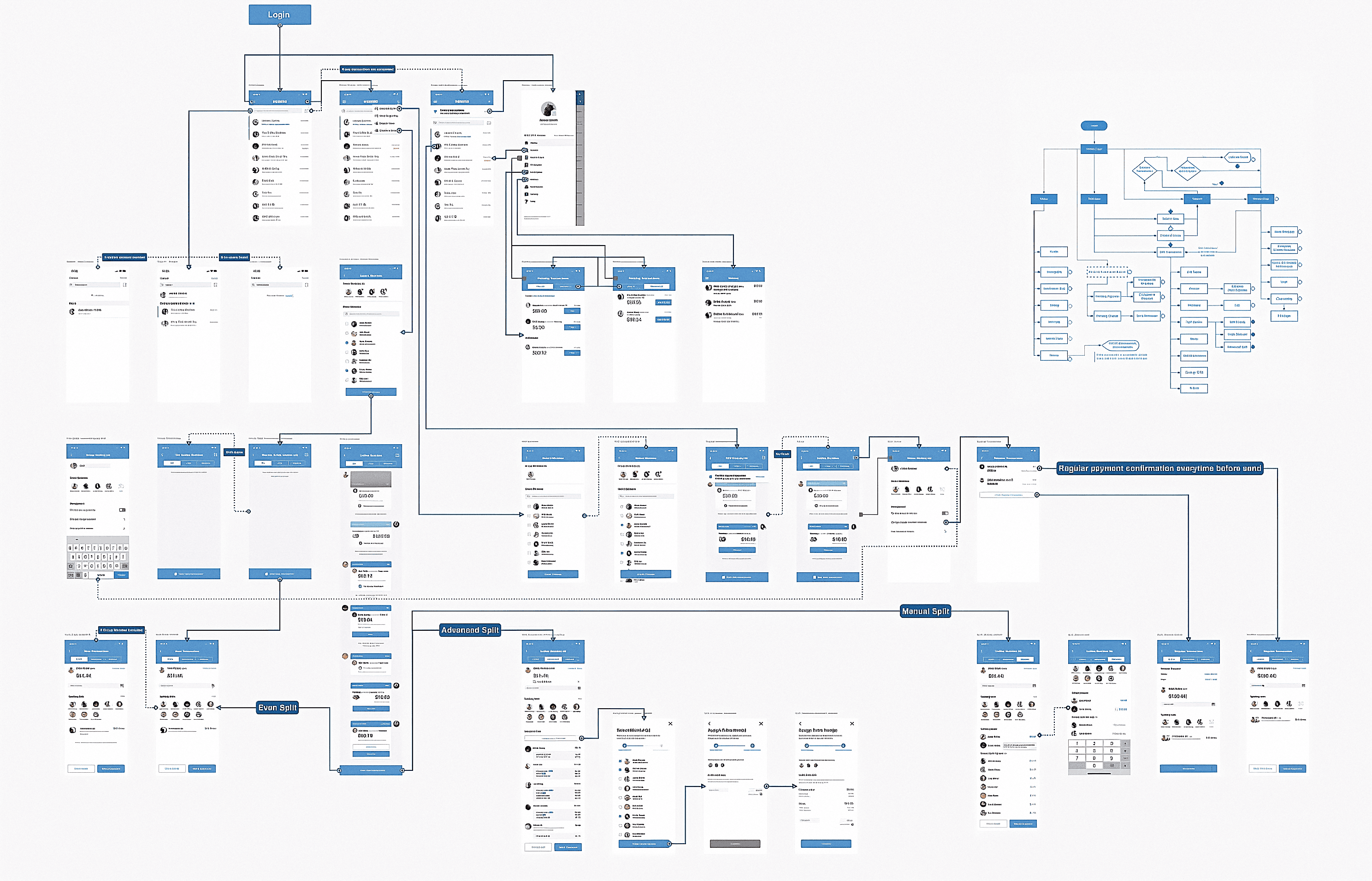
Before wireframing screens, we built a comprehensive decision-tree flowchart mapping every state, branching path, and error condition — from login all the way through transaction submission.
High Fidelity Prototype
Finalize High-fidelity Designs and Complete Edge-cases
The prototype covers the full Advanced Split journey, from the home feed through member selection, item assignment, and final summary. Every screen was designed with one job, one decision point, and a clear way forward.
Component Library
The system that made
the screens possible.
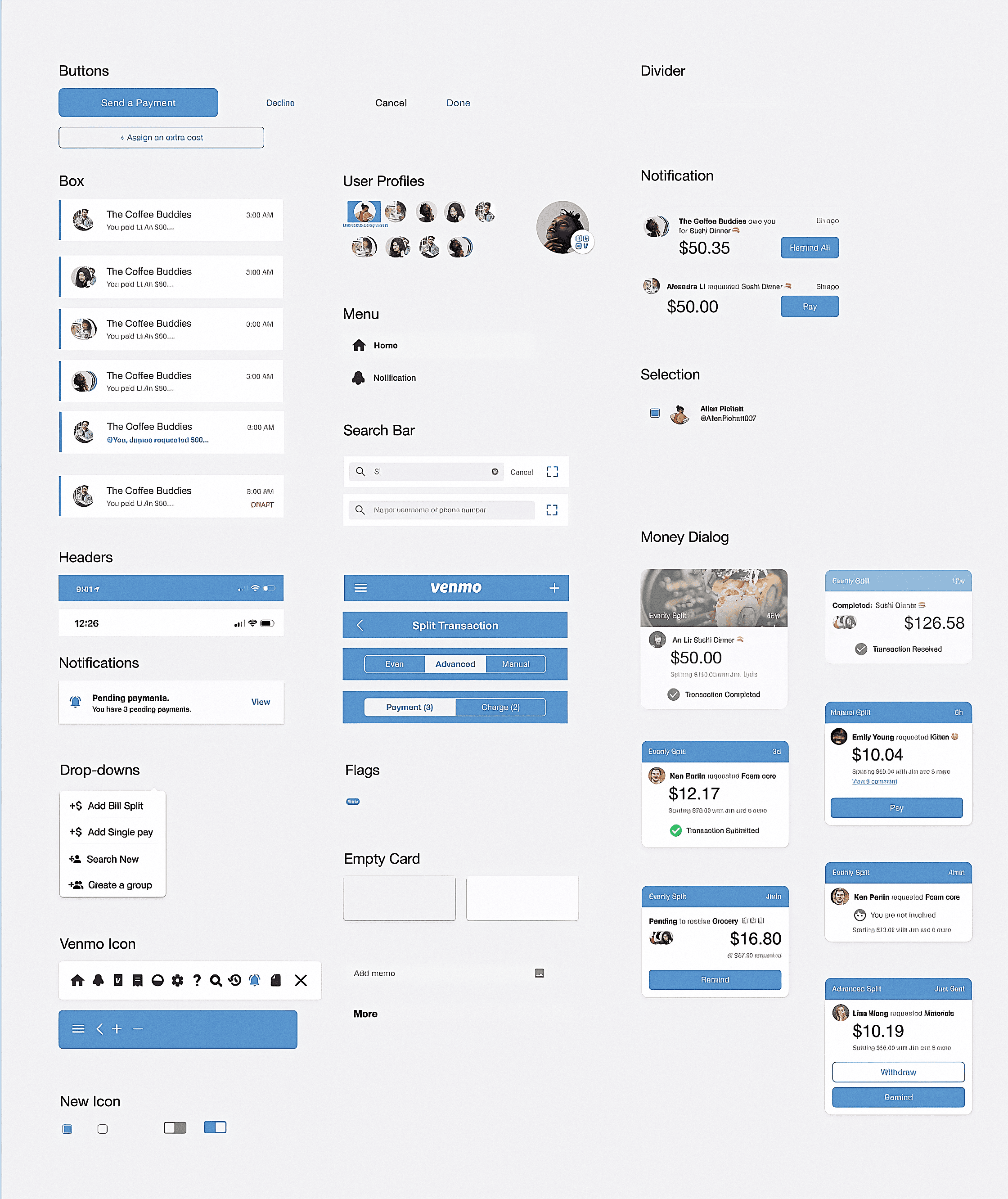
The component library was built before any screen was touched. Every button, card, tag, avatar cluster, dialog, search bar, header, and toggle documented and consistent. When it came time to design screens, the decisions were already made.
This isn't just Figma organization. Component-first thinking forces you to make decisions once and apply them everywhere, rather than solving the same problem differently on every screen.
→Buttons (primary, outline, text)
→Transaction rows with all states
→Money dialog cards (3 split types)
→Headers, tabs, search bars
→Notifications, dropdowns, toggles
→Checkboxes, user profiles, icons

Learnings
What this project
taught me.
Not general design principles. Specific things I learned from this project that will change how I approach the next one.
Architecture before aesthetics, always.
The feature analysis and IA flowchart felt like pre-work at first. By the time screens started, they were the most valuable things built. Every screen decision was faster because the architecture was already settled.
01
Components before screens is a rule, not a suggestion.
Building the component library first forced design decisions to be made once. When screens started, it was assembling, not inventing. Faster and far more consistent across the board.
02
The social layer matters as much as the functional one.
Reminding someone they owe money is emotionally loaded. Designing the reminder to feel passive rather than accusatory required as much thought as the split math itself. Good product design accounts for human feelings, not just user flows.
03